 Strokara: Draw & Replay for Android
Miss Live Message?
Draw on photos again.
Samsung dropped Live Message on newer Galaxy models, and Strokara was inspired by it. Draw or write on any photo with your finger or an S Pen, watch every stroke replay, export it as MP4 or GIF.

12 new brushes, plus zoom
Evergreen, Bone Chain, Witch's Brew, Pumpkin Ember and pinch-to-zoom, in 40 seconds.
See it in action
Draw, replay, export.
Inside the app
Real screens from Strokara on Android.
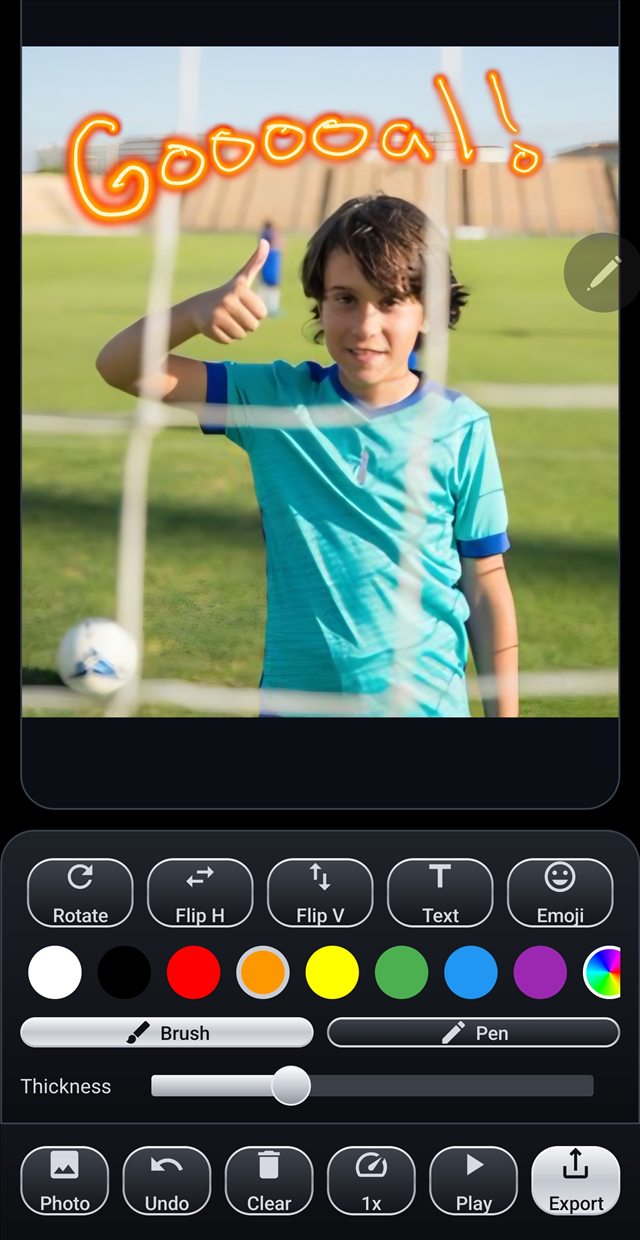
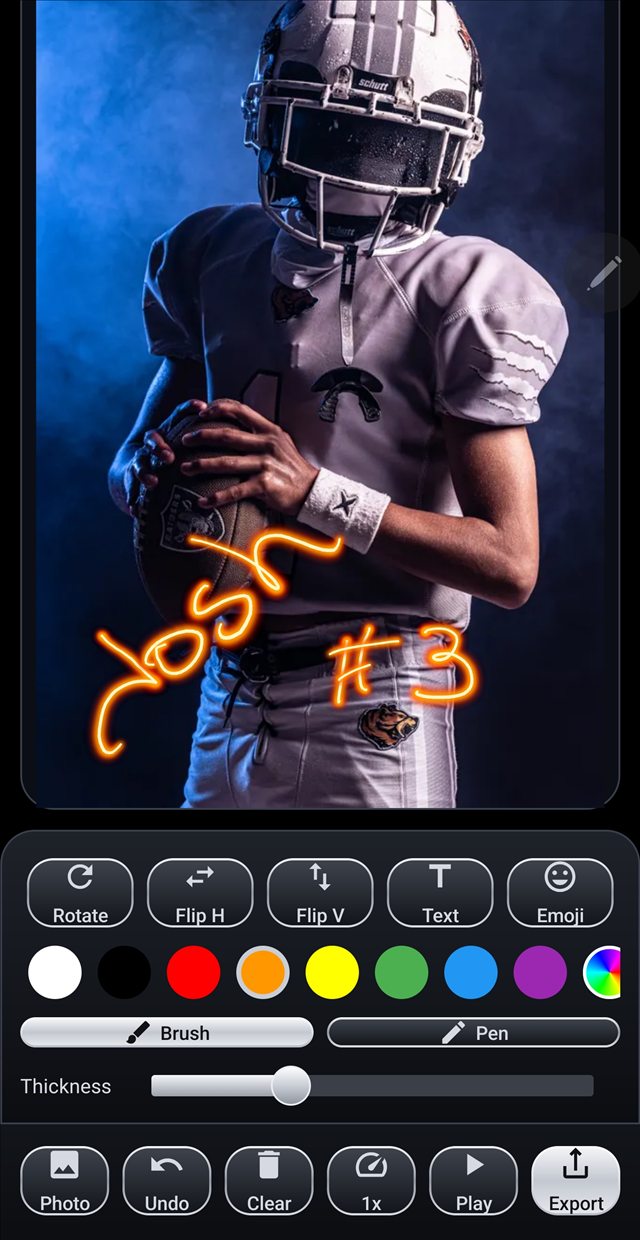
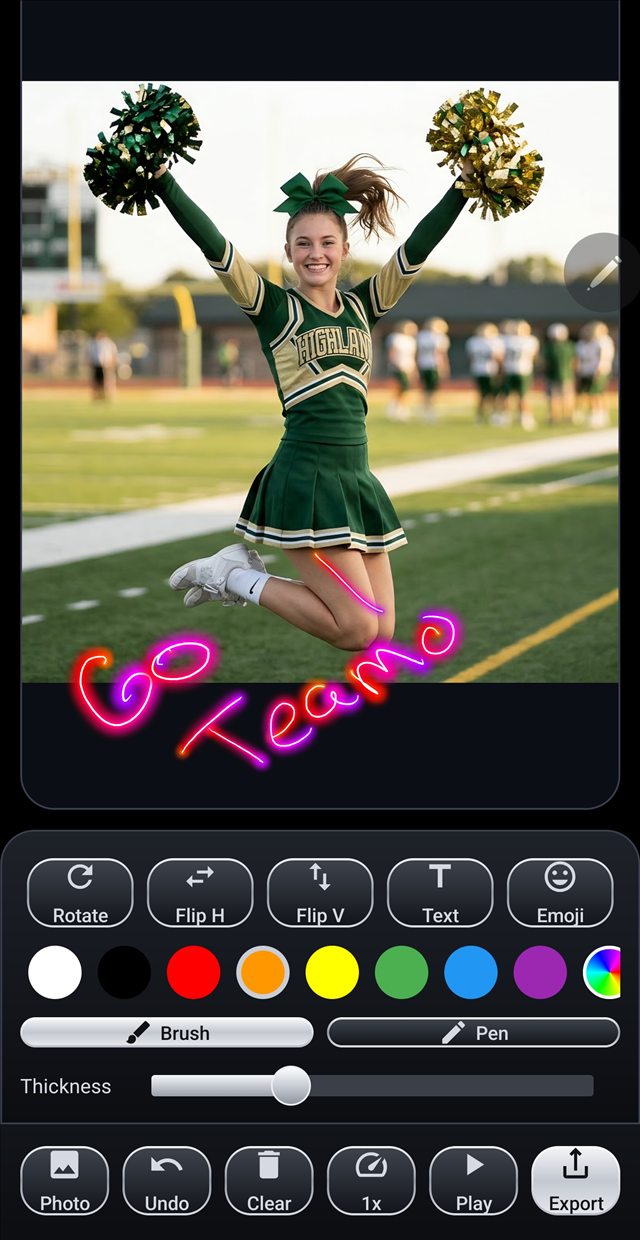
Real exports
Animated GIFs, straight out of the app.


New in version 3.1
Twelve new brushes for the holidays, a brush menu that is easy to browse, and zoom for fine detail.
Halloween brushes
Pumpkin Ember, Witch's Brew, Bone Chain and Black Cat. Embers lift off the line, potion bubbles pop and paw prints walk across your photo as you draw.
Christmas brushes
Ornament Beads, Gingerbread, Evergreen, Tinsel, Jingle Bells and Peppermint, all drawn stroke by stroke.
Fireworks and arrows
Firework Trail leaves a spark trail and bursts at the tip of your stroke. Cupid Arrows scatters hearts along the line and ends in an arrowhead.
Pinch to zoom
Zoom in up to 8x and pan with two fingers to draw fine detail. Replays and exports still show the whole photo.
A brush menu you can browse
Brushes are sorted into tabs, and every one shows a live preview, so you can pick by look instead of by name.
Strokes keep their thickness
Change the thickness slider and the strokes you already drew stay exactly as you drew them.
Three steps, no learning curve
Draw or write
Pick a photo or snap one in the app. Add a signature, a heart, a message with your finger or an S Pen. With an S Pen, pressure changes how thick and bold the line is.
Watch it replay
Strokara plays your drawing back stroke-by-stroke, exactly as you made it. Speed control from 0.5x to 2x.
Export and share
Save the replay as an MP4 or GIF and send it to anyone.
Made for the way you actually use it


What you get
A small, focused app that does one thing well.
Real S Pen pressure
Press light for a thin line, press hard for a bold one.
Stroke-by-stroke replay
The whole drawing plays back in the order you made it.
MP4 & GIF export
Share the finished replay anywhere — chats, feeds, anywhere.
Camera or gallery
Start from a photo you have or take a new one without leaving the app.
Questions
Do I need an S Pen?
No. You can draw and write with your finger on the screen. An S Pen adds pressure sensitivity, so lines get thinner or bolder as you press. Check the Google Play listing to see whether your device is supported.
What phones is it for?
It is an Android app, and you can draw with your finger. Galaxy devices with a built-in S Pen, such as the S Ultra line, add pressure sensitivity. Google Play shows whether your device is compatible.
Can I share my replay with people who do not have the app?
Yes. Replays export as standard MP4 video or GIF files, so you can send them to anyone.
Is it really a one-time purchase?
Yes. $2.99 once, yours to keep. No ads, no subscription, no data collected.
Is this affiliated with Samsung?
No. Strokara is an independent app by one developer, inspired by the discontinued Live Message. Not affiliated with or endorsed by Samsung.